
CD Copy Protection Woes

Ian writes:

I’ve just read your article on copy-protected CDs and I must say it was a very interesting read. I received the Robbie Williams album today but am having problems ripping the tracks to mp3. I have always used EAC for this purpose in the past but for some reason it won’t recognise the Escapology album. I am using the same version as you (v0.9) but still the CD isn’t detected. I can’t get even get my DVD-writer to detect the CD at all in explorer but at least my Lite-On CD writer does (not in EAC though). I’ve tried CDEx to rip to wav first then to mp3 in EAC but I am getting errors for the first track (the others rip ok, well 2-13 with a partial cd rip on 14 doing the trick). Any ideas how I can either get track 1 to rip ok without errors or to get EAC to recognise my CD? Any info would be appreciated.

I should point out (with a suitably snooty tone of voice!) that my role here is not to encourage the breaching of copyright. But I am certainly interested in all these copy protection issues, and seeing where they work and where they fail is a matter definitely worth exploring.
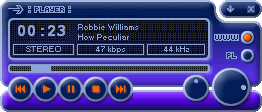
The CD player As I mentioned in my article, one of my computers would not recognise the CD initially. This seems to be a function of the operating system, the CD-ROM (or whatever) drive’s firmware and, perhaps, the BIOS within the computer itself. Possibly the firmware in your DVD burner has different standards for checking disc integrity than a typical CD-ROM drive.

Anyway, the work-around I used in that case was to simply insert the CD into the drive, close the door and wait. The AUTORUN.INF file in the root folder duly invoked PLAYER.EXE, also in the root folder, and the player application started. This seems to get the CD recognised before the firmware has a chance to start complaining. Once this was working Explorer was quite happy to display the files on the CD, and EAC was happy to extract the files.

If the PLAYER.EXE application doesn’t start up, perhaps you need to check your system’s setup. Have you disabled the automatic CD startup function in Windows? You will need to re-enable it if this is the case. Since PLAYER.EXE seems to be a version of Windows Media Player, check to make sure that Media Player works okay on your computer. Otherwise I’m at a loss.
Posted in CD, Computer, Copyright | Leave a comment

Room deadening and CRT projectors

Gary from Spectra Engineering in Western Australia writes:

An idea for your reader Dave would be to add some acoustic deading material to his sound room. This would cut the reflections and make the Bass sound field more even throughout. For example large heavy curtains work well. I have floor to ceiling carpet in the theatre (which looks better than it sounds) and a black acoustic absorbing ceiling which really does make a big improvement in this respect. What you then get is less boomy bass and a tighter more natural sound, abet at a softer volume, like running your speakers outside in the middle of a park.

You can certainly do massive amounts of tuning of the sound with acoustic treatments. Deadening material, though, tends to have a more significant affect upon the midrange and high frequencies than the bass. I use some deadening material: foam across the full back wall — and it looks worse than it sounds!

From the amount of treatment in your room, it seems that you are enjoying ‘direct field’ sound from your speakers. That’s where the sound you are hearing is almost all directly from the speakers, with very little reflection. There’s a lot to be said for this, especially in a home theatre context. My preference is for speakers that tend to widely disperse the mid and high frequencies, particularly for stereo usage, so I have plenty of hard, but irregular surfaces in my listening space. The advantages for my way are greater ambience and stage depth with stereo. The advantages for your way are sharper between-speaker imaging, and greater detail (less smearing from time-delayed room reflections). Oh, and you ought to get a very accurate frequency response since there will be less uncertainty on how the different frequencies will be reflected within the room.

Questions:
I heard that Plasma screens have a limited lifetime, much shorter than CRT TV screens, before they start to leak or degrade. Naturally, there is not much info on this.
Can you enlighten us?

That is what I hear as well. But I believe the lifetime is still up towards ten years, so the enthusiast will likely have replaced the screen well before this is an issue. As to leaking, I’ve never heard of it being a problem with respect to actually emitting noxious substances!

Precisely how long they will last though, is not really known since the oldest consumer Plasma displays are still just around five years old.

CRT projectors, it seems they are all being replaced by the inferior but brighter DLP projector. Apart from the ludicrously expensive (>$30K+++) “handmade” CRT projectors, what is there around now that is still manufactured new and worth considering?

You know, that’s what I thought until a few months ago. But it turns out that Barco has at least one CRT model that sells in Australia for around $14,000 (ie. cheaper than the Mustang-based DLPs). I am expecting to receive one for review in the next week or two and will post my impressions when I have some.

Posted in Audio, Equipment, Video | Leave a comment

DVD Menu Conveniences

The famous InstaPundit makes a valid point about the inconvenience of many DVDs:

The new Simpsons’ [Third Season DVD box set] release has a selection that basically lets you play each disc from beginning to end, like a video tape, without having to deal with menus. That’s a great idea, and all DVDs should have that option, easy to implement and up front. Or maybe all DVD players should have it.

Like him, I hate sitting through fancy menu build-ups. But unfortunately his DVD player solution won’t work. There are two reasons. First, under the DVD Forum’s licensing conditions, DVD players are supposed to honour User Operation Prohibitions. Sure, some player modifications allow these to be overcome, but all this achieves is allowing you to get to the main menu quicker, or jump straight to the program … if you know where it is. And this last point is the major problem. How is the disc logically organised? The majority of DVDs have the movie in Title 1, but not all. Where there are multiple episodes of a TV show on a disc, they are each normally in their own Titles, but not necessarily starting at Title 1. Or they may be all in one Title with a further logical division. Some weird tricks can be pulled on DVDs, including putting program material into no Titles at all. Unfortunately, there’s just no way a DVD player can take over the whole show, nice as that would be.

Posted in DVD | Leave a comment

Plasma advice

Neil writes:

… making sense of the plasma thing. We are getting conflicting messages from different hifi magazines. The last online review we found sang the praises of the Hitachi 32 pd3000. The size is right for our room. Any thoughts re plasma vs LCD?

I haven’t looked at any of the Hitachi plasma displays. But I can give you a few hints. First, check the display’s resolution. A lot of older plasmas use a resolution of 852 pixels across by 480 down, which means that for PAL you are getting less detail than the medium is capable of producing. You should look for a display that has a vertical resolution of at least 576 pixels, which usually means 768 or 1,024 depending on the panel manufacturer.

Second, look at the level of ‘black’ produced by the display. Some are a bit weak in this regard, with black being a dark grey, sometimes tinted slightly brown or green. Check it out at the store. Use a DVD with a night scene to ensure that you can see dark detail — but there’s a problem here because often the settings of TVs and panel displays are not adjusted to the best performance at the factory, and the shop may not want you fiddling with the controls. Still, if you’re going to be spending around $10,000, I think you ought to insist that you be allowed to test out the display properly (or take your money elsewhere).

Other than that, most plasma displays are pretty good on colour and peak brightness (when the appropriate adjustments are made).

Regarding plasma vs LCD, this is a battle that has not yet, I think, been fully joined by LCD. The large LCD screens have only just hit the market and are priced rather higher than plasma. I am not an enthusiast for the smaller LCDs, because I think their colours (particularly blues) are a bit water-colourish. Still, I haven’t reviewed a large one yet so perhaps they are better. LCDs are thought likely to have a longer life than plasma displays, but expect their prices to fall rapidly and their quality to improve sharply over the next few years, so this might not be a consideration.

I suspect that we are not that far from seeing full high definition (ie. 1,920 by 1,080 pixel) panel displays.

Posted in Equipment, Video | Leave a comment

Room size and bass

Dave from Cheltenham writes:

I came across a comment on an audio website recently that said something to the effect that a small room or a large room will reduce bass response from speakers. I have a pair of Tannoy Arden speakers (15″ dual concentrics) in a large room, 4.5m W 11.5m L and 3.9m H and the bass response does seem to be rather less than in some other smaller spaces they’ve occupied in other houses. Are you able to shed any light on this for me

I haven’t done any rigorous work on this issue, but I suspect that these kind of claims — which have been around as long as I’ve been interested in the game (thirty-odd years) — are overblown and somewhat of a misinterpretation of what happens.

In fact, unless one is outside or in a huge room (some kind of indoor stadium), the major problem with bass is a lumpy response due to constructive and destructive interference. The reason I say ‘huge’ becomes obvious when you consider the wavelengths of bass frequencies. At 20C, a 40 hertz tone has a wavelength of around 8.6 metres. At 20 hertz, it is 17.2 metres. At these kinds of frequencies the wave will have bounced from several surfaces before even producing a full cycle!

In most modern homes, even large dimensions in a listening room don’t solve these problems because few have ceiling heights much more than 2.5 metres (although you have a wonderfully high ceiling, I see).

The bass performance of any speakers will vary according to the various dimensions which determine which frequencies are subject to destructive and constructive interference. The relevant dimensions are the distances between the major surfaces (walls, ceiling and floor), the distances between the speakers and the surfaces, and the distances between the listening position and the surfaces and speakers. The best bet is trying to make sure that none of those distances are whole multiples of any of the other distances … but then we will be getting into multi-dimensional matrices to try to solve that one!

The other way to best achieve smooth bass response is to follow tradition and simply experiment. It is hard to change room dimensions, but try moving the speakers around, even by a few feet, and experiment with different listening locations.

Posted in Audio | Leave a comment

CD emphasis calls for caution in ripping

There is a little-known feature of CDs called emphasis. This is primarily a noise and distortion reduction mechanism, provided for when CDs were first designed over twenty years ago. In short, the idea is that the engineer boosts the treble before laying down the digital data, while the CD player cuts this back once again for a flat frequency response.

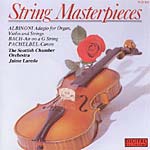
Now CDs that actually use this facility are exceedingly rare. I’ve just checked a hundred or so of my own, none of which used emphasis, until I finally remembered which one did: String Masterpieces (Innovative Music Productions, PCD 802). I while back I needed to copy a track from this onto CD-R, but the quality of the transfer bothered me immensely. It sounded very harsh indeed.

That high frequency boost reaches to more than 10dB! So why didn’t the CD player de-emphasise the treble? Because, silly me, I had digitally ripped the track and ripping copies the digital data as it is on the disc, ignoring the emphasis bit. Burn a new CD with the track and you get the high-treble-level of the music. Not nice.

Posted in CD, Copyright | Leave a comment

A socially useful application of home entertainment technology

While I have no doubt at all that my current line of work is far more socially useful than my previous employment as a government servant, I am still sometimes niggled by, what shall I say … perhaps a lack of gravity in what I do. Sure, my aim is to guide people towards getting maximum value for their dollar in home entertainment equipment, but it isn’t exactly saving the world, or even saving lives.

So it is somewhat heartening to read an article entitled CD Player Turned Into Bioassay Molecule Detection Instrument over atFuturePundit.com:

Scientists at the University of California at San Diego have adapted an inkjet printer and a CD player to make a scientific instrument that detects types of proteins molecules present in a solution …Compared to the $100,000 price tag for a fluorescent protein chip reader … a CD player costs as little as $25.

Posted in CD, General Tech | Leave a comment

Phase 2 of the Home Entertainment Dictionary complete

Well, I’ve worked my way through the Dictionary of Home Entertainment, fixing up the silliest entries and richly cross-linking terms. So now I’m happy with it, but only as far as it goes.

Phase 3 will consist of adding the (gasp!) 76 additional terms I’ve thought of so far.

Phase 4 will consist of adding some small pictures.

Posted in Admin | Leave a comment

Recording 96kHz, 24 bit PCM to DVD

I had this wonderful idea for an article, which I promptly put to the editor of Australian HI-FI and which he equally promptly accepted. The idea:

Obviously recording LPs to CDs is old-hat. But now that DVD burners for computers are coming down in price, I wonder if it might be interesting to do an LPs to DVDs piece. The idea is that you install a high quality sound card (something that supports 96kHz, 24 bit) and record at high resolution. Now I’m assuming that there is DVD burner software around that supports 96kHz, 24 bit LPCM audio. I’ll look into that. But assuming there is, what do you think of the concept?That might give LP lovers the best of both worlds. The convenience of digital discs and what ought to be pretty damn close to the sound of LPs.

Incidentally, it would have to be on a computer. All consumer DVD recorders use Dolby Digital 2.0.

There’s only one problem. After making some enquiries, it seems that none of the software bundled with DVD burners, and none of the relatively affordable consumer-level DVD recording software, support 96/24. Some apparently support 48/16. Wow. Hardly better than CD’s 44.1/16. There is super-expensive professional software, but this is unlikely to appeal to someone who only wants to archive a couple of dozen LPs, not become a DVD distributor.

If I have this all wrong, please hasten to let me know! Remember, the software would not need to manage the 96/24 recording. I would (indeed do) use other software for that. All it would need to do is be able to transfer a 96/24 WAV file, unaltered, to a DVD-R or DVD+R.

Posted in Analogue, Audio, DVD | Leave a comment

The Home Entertainment Dictionary improves a little

I’ve been doing a bit of work on the Dictionary of Home Entertainment. I’ve added a number of terms and definitions, filled all but one of the missing definitions, and enriched the internal links up to and including dither. In the process I’ve thought of no less than 26 more terms and definitions I’m going to have to add. Oh well.

Posted in Admin | Leave a comment