Screwing up PAL DVDs

PAL DVDs are better than NTSC DVDs in a couple of ways. One of those is higher resolution, and the other way is a cleaner sequence of frames — ones that do not produce interlacing artifacts.

That is, of course, unless the producer of the PAL DVD messes them up. This has happened with the Roadshow Entertainment titles Pulp Fiction and Mad Max, and the 20th Century Fox title Independence Day. Read all about itin my new essay.

Posted in DVD, Video | Leave a comment

Dark Details in Plasma Displays

I recently received an email complaining about an LG Plasma display. My correspondent was very dissatisfied with the way dark levels in movies changed their brightness levels. This is taken from my response.

I had actually reviewed the same model of Plasma display (MT-42PZ15) some time previously, but had not noticed any unusual problems in this regard.

We ought to look at problems related to Plasma displays in general. No display technology is perfect. It’s just that each different technology comes with its own different set of imperfections. In the case of plasma displays, the most significant complaints concerns the reproduction of subtle variations of near-black. This is put well in a PDF on display technology located here (~230KB), (p.18):

The biggest obstacle that plasma panels have to overcome is their inability to achieve a smooth ramp from full white to dark black. Low shades of grey are particularly troublesome, a noticeable posterised effect often being present during the display of movies or other video programming with dark scenes. In technical terms, this problem is due to insufficient quantisation, or digital sampling of brightness levels. It’s an indication that the display of black remains an issue with PDPs.

To the right are two small B&W pictures to demonstrate what ‘posterization’ is. The top one is unmodified while for the bottom one I reduced the number of grey scales to eight, using Photoshop’s posterize function. Now imagine a dark scene which has a brightness level right on the boundary between two of those posterized dark grey levels. With the very subtlest of changes in the source, it could flick between the two levels. Alternatively, LG’s processing circuitry may be not quite stable, causing ‘black’ levels on the boundary between two of the posterized levels to flick between the two.

Assuming everything is working properly, what can be done to reduce the problem.

First, see if the panel sports what LG calls its ‘Digital Eye’ feature or a similar feature. This appears on a number of conventional TVs and detects the prevailing light conditions. If switched on, it adjusts the picture setting automatically with the intention of optimising the brightness, contrast and colour levels for the best picture. (How a picture looks depends very much upon the environmental light.) If this feature is fitted, consult the manual and find out how to turn it off. I have found such features to have unpredictable effects that are more irritating than useful.

Second, it may be necessary to trade-off dark detail for stable dark areas. Use the picture adjustments here. The two of interest are ‘Contrast’ and ‘Brightness’. In virtually all TVs these operate opposite to the way that you would expect. ‘Brightness’ controls the black levels, ‘Contrast’ controls the brightness levels. Weird, but true.

Put on a DVD with dark scenes at the edge of the frame. Put your screen into 4:3 mode so that there are unused sections on the left and right of the screen. Pause the DVD. Turn down the ‘brightness’ level until the darkest areas of the scene match the darkness of the unused areas of screen on the sides. Does the problem persist? Try turning it down a little more.

Also, try turning down the ‘Contrast’ control. Often this is set far too high. Let’s say that there are 16 shades of grey spread evenly over the luminance spectrum from black to white. If ‘contrast’ is raised too high, then the three brightest shades may become indistinguishable (in other words, the image is ‘clipped’ at the white end). The relevance here is that instead of having 16 visible shades, you only have 14 visible shades. So there is a greater variation between each shade across the brightness spectrum. This will make each step at the dark end more obvious.

You can see how I have replicated this in the picture at the right. Notice how the light grey areas have all become white, while the dark grey areas are now much more sharply differentiated from each other.


Posted in Equipment, Video | Leave a comment

Bose’s critics

Here’s the introduction to a forthcoming review of mine to appear in The Canberra Times:
If you look around the Internet you will find Web sites that aim to ‘tell the truth’ about particular businesses and products. So you will find sites exposing Scientology, Amway and … Bose! What is it about Bose that gets up the nose of some audiophiles?Can you get better sound for fewer dollars than Bose provides? For sure. Does Bose inflate its quality somewhat in its promotional literature? Absolutely, but then do almost all other companies.

So let’s keep things in perspective. Bose’s subwoofer/satellite systems aren’t the best value for money, nor the world’s most accurate speaker system, but they fill a need that many people find more important: good sound quality from inconspicuous speakers.

I should add that Bose is, in engineering terms, a thoughtful company. There are little things that many more highly reputed companies either don’t think about, or seem to consider to be someone else’s problem. Specifically, Bose’s Acoustimass speaker systems manage the satellite/subwoofer crossover themselves. Many other sub/sat systems rely on the receiver’s crossover. The problem there is that more than half home theatre receivers use a fixed 80 hertz crossover, which is far too low for small satellites.

Okay, even Bose isn’t perfect in this crossover region (my measurements on the Acoustimass 16 Series II show the 110-220 hertz region down around 6dB from the overall level), but it at least attempts to deal with this. The remarkably good value JBL Simply Cinema SCS 20, for example, suffers a 9dB drop from 75 to 220 hertz when connected to a regular receiver. And similar designs suffer similar problems.

Posted in Audio, Rant | Leave a comment

Telarc’s height

Some Telarc DVD-Audio and SACD discs have a ‘height’ channel rather than an LFE. Personally, I think this is a rather poor idea. To see why, read this email I wrote to Telarc about it.

Posted in Audio, Rant | Leave a comment

Telarc’s cannons

Way back in 1978 the American audiophile record label Telarc made a recording that can be truly regarded as legendary. Using then-new digital recording technology (although in the absence of a digital consumer format, the original release was on LP), Telarc captured Tchaikovsky’s 1812 Overture, and for perhaps the first time the cannons were properly recorded.

On my CD version attention is drawn to this by:

WARNING! The cannons of the Telarc Digital “1812” are recorded at a very high level. Lower levels are recommended for initial playback until a safe level can be determined for your equipment.

They were impressive indeed. If you use rear-vented bass reflex speakers, expect any curtains or other materials behind the ports to punch back with the blasts. This recording was universally well-received, the only real complaints being the lack of a choir, and the fact that the orchestra had to be played at a lower than pleasing level in order to accommodate the cannon blasts at the end.

So how loud were these cannons? As it happens, one of the blasts produces a 38 hertz tone that considerably exceeds the maximum recording level of a CD! How can this be? After all, all PCM-based digital recordings have hard numerical limits. Analogue signals are mapped onto a 16 bit space. There can be no value greater than 32,767 or less than -32,768.

The way to go louder than ±215 in a 16 bit format is to do a bit of heavy clipping. The signal is wound up so loud that the tops and bottoms of the wave forms are chopped off. Hi-fi types are against clipping, of course, because it introduces rather high levels of harmonic distortion into the signal, making it sound harsh.

But surely Telarc wouldn’t have clipped its signal. After all, it makes a point of avoiding signal processing as stated on the CD’s sleeve:
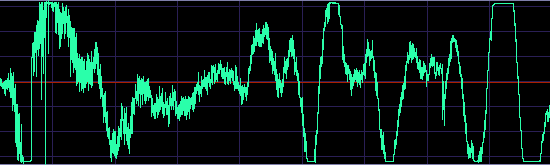
During the recording of the digital masters and the subsequent transfer to disc, the signal was not passed through any processing device (i.e., compression, limiting, or equalization) at any step during production.

I have no reason to disbelieve Telarc. So given the limited technology available in 1978, it’s likely that the whole balancing thing was done by ear. That there was clipping, though, cannot be in doubt. The screen shot above shows the first two-tenths of a second of the right channel of the first cannon blast (digitally ripped from the CD, so there are no equipment limitations imposed on the result). It was only for reasons of keeping the graphic legible that I cut off the other four clipped peaks from this blast. The left channel is virtually identical. Nearly all the 16 cannon blasts show some clipped peaks.

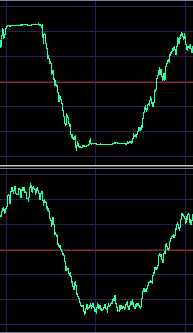
There is reason to believe that the clipping occurred earlier in the chain than in laying down the recording on CD. The second cannon blast (see right), for example, shows clipping on a couple of the peaks even though these do not approach the CD limits. Indeed, the slope of the clipping (the sharp edges moving back slightly towards zero) tends to suggest that this is analogue, rather than digital, clipping. Perhaps at the microphone pre-amplifier stage. Capturing huge impulse signals is notoriously difficult. I once recorded a public fireworks display on DAT. Even though I was a couple of hundred metres from where the explosions were happening, I had to use the line input rather than the microphone input of the recorder to avoid clipping (later calculations suggested that there were instantaneous peaks of around 160dBSPL!)

Posted in Audio, CD, Vinyl | 3 Comments

Strange happenings with DVD+R and Philips DVDR890

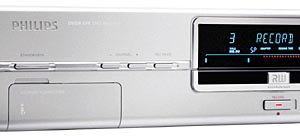
I’ve noticed something strange about the way Philips’ DVDR890 DVD recorder burns DVD+Rs. Here’s the first couple of lines of a DOS DIR /S command, when a duly finalised Verbatim DVD+R is in my computer’s DVD-ROM drive:

 Volume in drive F is PHILIPS_DVD_VR
 Volume Serial Number is 6533-3D0C

And here’s the same command on a finalised TDK DVD+R:

 Volume in drive F is PHILIPS_DVD_VR
 Volume Serial Number is 6533-3D0C

Notice anything? Kind of identical, aren’t they. Both of these discs contain recordings of broadcast TV programs made at different times. Both were recorded on a Philips DVDR890. And, as it happens, when I checked a couple of other discs burnt on the same machine, they also were the same. If any of you has one of these recorders which you’ve used to burn a DVD+R, could you advise me what the label and volume serial number of the resulting disc is please? (scdawson [at] hifi-writer.com) It could be that each recorder applies a different serial number.

For the most part this isn’t a problem. But it can cause a couple of slight inconveniences. For example, if I place one such disc in my DVD-ROM drive straight after another one, the computer thinks it’s the same disc. I have to stick in something else in between the two to make sure the computer re-reads the disc.

For another, if I have stopped watching one half-way through on, say, a Sony DVD player that memorises the last played-to position, then the next time I stick another DVD+R into the same Sony player, it commences play from that same timing point, thinking it’s the same disc.

Posted in DVD, Recorders | Leave a comment

High Definition Camcorders on the way

Canon, Sharp, Sony and JVC announced today that they’ve agreed on a high definition consumer digital video camera format. Likely to be called ‘HDV’, this will provide for recording 720p or 1080i on standard DV format cassettes. Both 50 and 60 hertz varieties will be supported, so these ought to be compatible with HD TV systems around the world. The video will be encoded using MPEG2 (ie. similar to DVD, but at bit rates of 19 and 25Mbps respectively) and the audio will be two channel Dolby Digital at 384kb/s.

This last is interesting. The normal bit rate for two channel DD is 192kb/s. So why the high rate? Perhaps to allocate space to support DD5.1 (which is normally on DVD at 384 or 448kb/s) in the future.

Posted in Equipment, General Tech, Video | Leave a comment

Digital Set Top Box Review appears

I hear that my review of four Digital Set Top Boxes appeared in today’s ‘Livewire’ section in The Age. After two years of sluggish movement on digital TV, suddenly there are announcements of DSTBs from Panasonic and Toshiba, both of whom will be attempting to wrest market share from DGTEC which, until now, has enjoyed a monopoly on High Definition units.

UPDATE (Friday, 4 July 2003, 11:11 am): – From a Sony press release dated 1 July 2003:

Starting July 2003, Sony will commence bundling its Plasma Television sets with the DGTEC HD Set-top-box (STB). By September/October 2003 Sony intends that all its widescreen televisions will be IDTV, or have the option of being bundled with SD or HD set top boxes.

Posted in DTV | Leave a comment

Southern Cross Capital behind the times in the South

Of Canberra, that is. Sure, it’s not the only one that has yet to provide Standard Definition Digital TV from its Tuggeranong retransmission tower (Prime and SBS are equally guilty), but as of last night SCCap had a promise for a startup in June 2003 on the Digital Broadcasting Australia Web site.

This is particularly irritating because SCCap has never got around to upgrading its analogue Canberra broadcasts to stereo sound.

UPDATE (Friday, 4 July 2003, 11:07 am): – I whinged about this to DBA and now, I see, they have updated their site so that it shows Southern Cross Capital providing to us Valley residents digiTV some time between July and September 2003. Likewise for Prime.

Now, I suppose, just a few more years to go before High Definition comes to Canberra as well.

Posted in DTV, HDTV | Leave a comment